
Cloudflare Blocked Googlebot for 2 Weeks: What It Cost and How to Fix It
In July 2026 I was called in to a site whose organic traffic had fallen off a cliff. Their managed IT provider had switched on a Cloudflare setting to block all bots from crawling the site, and Googlebot was one of the bots it blocked.
It ran for 2 weeks before anyone worked out why. In that time the site lost its organic search traffic, its Google Ads stopped serving properly while Google happily kept taking the money, and every Merchant Centre listing disappeared.
I posted the Search Console screenshot on LinkedIn on August 12, 2026 as a warning to other people running sites behind Cloudflare. It did 584 reactions, 65 comments, 34 reposts and 81,654 impressions, and most of the comments came from people who had seen the same thing happen. The next day Barry Schwartz, News Editor of Search Engine Land and founder of Search Engine Roundtable, wrote it up under the headline "Misconfiguring Cloudflare Can Hurt Your SEO Badly".
Here is how I traced it back to a 403, and how to check your own setup.
How I Found It
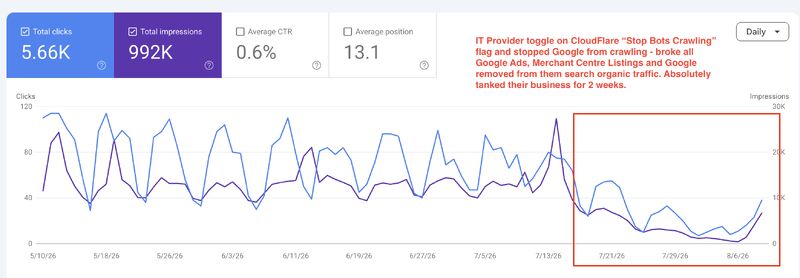
The client's Search Console performance report. Clicks and impressions run at a normal weekly rhythm until around July 21, 2026, then collapse and stay down for 2 weeks.
I am not naming the client or the IT provider. It is an easy mistake to make.
More than one thing was broken, so I worked through all of them:
- Google Ads was still spending, but the ads had picked up destination errors.
- Merchant Centre had disabled the product listings and reported that it could not reach the landing pages.
- Search Console showed crawling had stopped and pages were dropping out of the index.
Underneath all three was the same response: 403 Forbidden. Google was not being told "don't crawl this", it was being refused outright, everywhere it touched the site.
A 403 that consistent made an edge block worth investigating, although applications and origin firewalls can return the same status. Something in front of the site was deciding who got in, so I went to Cloudflare, and there it was. The IT provider had enabled the option to block bots from crawling the site. It caught Googlebot along with everything else.
The site itself was fine the whole time. It loaded in a browser, uptime monitoring stayed green, and the origin logs looked clean because the blocked requests never reached the origin. Nothing anyone was watching requested the site the way Google does, so nobody saw it for 2 weeks.
What Actually Broke
Organic Search
A block at the edge does more damage than a robots.txt mistake. A Disallow rule says "please don't crawl this", and Google can still keep the URL in the index without the content. A 403 at the CDN says "you cannot have this page at all". Pages that keep getting refused get dropped, and rankings go with them.
Google Ads
This was the part that surprised people most in the LinkedIn comments. Google Ads checks landing pages with AdsBot-Google and AdsBot-Google-Mobile, and Google deliberately exempts those crawlers from the global User-agent: * rule in robots.txt, so that a blanket disallow does not break paid landing pages by accident.
They cannot ignore a firewall refusing the connection. When AdsBot cannot fetch a landing page, ads pick up "destination not working" disapprovals and landing page quality assessments degrade. Spend keeps running in the meantime.
Merchant Centre
Merchant Centre verifies product landing pages before it will show items. When those pages cannot be fetched, Google disables the products rather than send shoppers to a page it cannot verify. Free listings and Shopping ads go with them.
Search, Ads and Shopping are three separate Google products, and all three depend on Google being able to fetch your pages. One edge rule takes out all three.
Why This Is Getting More Common
Crawl volume from AI companies has climbed sharply and a lot of sites are feeling it as server load. Cloudflare responded by making it a one-click job to block AI crawlers, which put the button in reach of anyone with dashboard access.
Barry Schwartz sees enough of these to treat it as a pattern rather than an oddity, saying he sees "way too many cases of this popping up and causing such a pain for SEOs to fix". His read on the cause:
There are tons of settings in Cloudflare and similar tools, many of them aim to protect your site from AI bots and rogue crawlers. But sometimes, if you don't read or understand them, you can end up blocking search engines and AI crawlers that you did not intend to block.
He ran my case alongside one Brodie Clark had documented, where an online marketplace was hit so hard by bot traffic that firewall-level restrictions were the only way to keep the site up, and SEO was the casualty. My LinkedIn comments ran the same way: people describing Cloudflare's automated protections as too aggressive out of the box, several sharing their own version of it, and a few flagging the September 2026 default changes as the next round.
Those controls are now changing again. Cloudflare is replacing the blanket "block AI bots" toggle with three categories: Search, Agent and Training. From September 15, 2026 new defaults apply, and multi-purpose crawlers are judged by the strictest rule that matches them. Cloudflare's own wording:
multi-purpose crawlers such as Googlebot, Applebot, and BingBot will be blocked by customers who have selected to block Training.
Googlebot both indexes for Search and feeds AI training. Block Training to keep your content out of AI models and you can block your search visibility in the same click.
The other cause is organisational. The person who administers Cloudflare is almost never the person who owns SEO, and may not know that the bot settings decide whether Google can crawl at all.
What to Review Before 15 September
Cloudflare's current control documentation distinguishes defaults for new domains from the treatment of mixed-purpose crawlers. Search remains allowed in the new-domain defaults, while Training and Agent defaults apply to pages displaying ads. Separately, a crawler classified for both Search and Training can be affected by a Training block.
For an existing domain, inspect the chosen settings and the opt-out described in Cloudflare's announcement; do not assume every site will receive the same blanket block. Record the current choice, identify the Google crawlers the business needs, and verify access after any setting change. AdsBot and Shopping access still need their own checks.
The Cloudflare Settings That Can Block Google
Worth reviewing all of these, not just the one that caused this incident:
- AI crawler controls. The category that caused this case. Check what is blocked, and check it again before September 15, 2026.
- Bot Fight Mode. Issues computational challenges to anything it classifies as a bot. Cloudflare's documentation notes it does not run on the Ruleset Engine, which means you cannot exempt anything from it with a WAF custom rule or a page rule. On a commercial site, that limitation alone usually rules it out.
- Super Bot Fight Mode. Blocks "definitely automated" and optionally "likely automated" traffic. It does run on the Ruleset Engine, so it supports skip rules and exceptions.
- WAF custom rules by country or ASN. Googlebot crawls predominantly from US IP addresses, so a "we only sell in Australia, challenge everything else" rule will block it.
- Rate limiting. Crawlers request pages in bursts, so thresholds set for human traffic will catch them.
- "I'm Under Attack" mode left switched on after an incident. It challenges everyone, including crawlers.
- Origin firewall rules. The same block can come from the server. Check there too.
That last one is the oldest version of this problem. Barry made the point that none of it is new: twenty years ago the same damage came from Apache rules and robots.txt mistakes. There are just far more switches to get wrong now.
How to Check Whether You're Blocking Google Right Now
1. Run a live URL Inspection in Search Console. Not the indexed result, the "Test live URL" button. If it comes back "Blocked due to access forbidden (403)" or the fetch fails, that is your answer. The indexed version can keep looking healthy for days after crawling has stopped.
2. Read the Crawl stats report (Settings, then Crawl stats). Look for a cliff in total crawl requests and a jump in the share of 4xx or 5xx responses. Crawl stats move days before rankings do.
3. Watch the Page indexing report for pages moving into "Blocked due to access forbidden (403)", "Blocked due to unauthorized request (401)", or a rise in "Crawled, currently not indexed".
4. Fetch your own site as a crawler, from outside your network:
1curl -sSI -A "Mozilla/5.0 (compatible; Googlebot/2.1; +http://www.google.com/bot.html)" https://example.com/2curl -sSI -A "AdsBot-Google (+http://www.google.com/adsbot.html)" https://example.com/A 200 is good. A 403, a 503 with a challenge page, or an HTML interstitial where a page should be is your problem. This is a rough check rather than proof: it only tells you whether you block requests claiming to be Googlebot, and it will not catch a geo rule if you are testing from the country you allow. Run it from a US IP if you can.
5. Look at Cloudflare's own logs. Security, then Events, filtered to bot and verified bot traffic, will show you block and challenge actions against Googlebot directly. Then read every WAF custom rule you have, in order.
6. Check Merchant Centre diagnostics and the Google Ads policy manager. Unavailable landing page errors and "destination not working" disapprovals point back to the same 403.
One thing to avoid: never build an allow rule that trusts the user agent string alone, because anyone can send it. Google publishes JSON files of its crawler IP ranges so you can verify a request genuinely came from Google.
How to Fix It
- Turn the block off first and sort out the correct configuration afterwards. Every hour it stays on is lost crawl.
- Allow verified search engine crawlers explicitly. If you are on Super Bot Fight Mode or Bot Management, add a skip rule for verified bots. If Bot Fight Mode is on, you cannot exempt anything from it, so switch it off and use the Ruleset Engine options instead.
- Handle AdsBot and StoreBot separately. Cloudflare categorises
AdsBot-Googleas advertising, not search, so a rule that allows "search engine crawlers" does not necessarily save your Google Ads. - Confirm the fix with a live URL Inspection test and check you get a clean fetch, not just a working page in your own browser.
- Ask for re-crawling. Use "Validate Fix" in the Page indexing report on the affected groups, request indexing for your most important pages, and resubmit your sitemaps. Do not burn a day requesting individual URLs; sitemaps and validation move far more.
- Refresh the downstream products. Once crawling is working again, re-fetch the Merchant Centre feed and resubmit disapproved ads for review.
- Check
robots.txttoo. Providers doing a security tidy-up often change both.
What Recovery Actually Looks Like
Recovery takes longer than the outage did.
August 20, 2026 update: roughly 3 weeks on from the fix, the site is climbing but still only about halfway back to where it was before July 21. Clicks and impressions improve each week, the most important pages returned first, and the long tail is still missing. I will update this again once it settles.
How long it takes depends on how long you were blocked and how often Google crawls you normally. Large, frequently crawled sites come back faster. Rankings return in crawl priority order.
Change nothing else while you recover. If you rewrite title tags and restructure navigation in that window, you will never know which change caused what.
How to Stop It Happening Again
- Decide who owns the CDN and WAF configuration, and write it down. In this case the IT provider held the keys and the consequences landed on people who had no idea a change had been made.
- Treat edge security settings as a deployment, not a toggle. They deserve the same change window, notification and post-change verification as a code release.
- Monitor crawling, not just uptime. Uptime monitoring requests your site from a monitoring IP with a normal user agent, and it stays green through this entire failure. Add a check that fetches a key page with a Googlebot user agent, and review Crawl stats weekly. Search Console will email you about a spike in indexing errors, but by the time it does you have usually lost a week, so make sure those emails reach someone who reads them.
- Diarise a settings review before September 15, 2026, when Cloudflare's new crawler defaults take effect.
If nobody currently owns this on your site, it is one of the things a website maintenance plan should be covering.
Where to Start
If your traffic drops suddenly and your content and rankings do not explain it, check whether Google can still fetch your pages before you check anything else. Run a live URL Inspection and look for a 403.
And if someone else administers your CDN, ask them today what your bot settings are set to.
Syntax highlighting by Torchlight